

Smart Life Blog

INSIGHTS & INNOVATIONS

Latest industry updates, health wearable trends, and kids safety technology guides from iTIME.

0%

Choosing a Kids 4G Smartwatch in 2026 requires more than comparing colorful designs and low prices. Parents need a practical device that supports communication, location awareness, and everyday safety without creating unnecessary dependence on screens. A reliable choice should offer stable 4G connectivity, accurate location tracking, clear two-way calling, and a simple emergency contact feature. It should also feel comfortable on a child’s wrist during school, outdoor play, and rainy walks home.

Real-world details matter. Check whether the watch lasts a full school day with location services active. A small battery may struggle during frequent calls or weak network coverage. Review the parent application carefully, because confusing menus can delay an important action. Water resistance, strap quality, speaker volume, and charging design deserve equal attention. Children may drop the watch, forget to charge it, or press buttons repeatedly. Those moments reveal more than polished product images.

Independent testing is valuable, but no single review tells the whole story. Compare manufacturer specifications with user experiences from trusted retailers and technology reviewers. Confirm network compatibility in your region before purchasing. Privacy settings also deserve careful reading, especially when location data is stored online. Some features may sound essential but remain unused in daily life. A watch that performs a few important tasks consistently can be more useful than one filled with distractions. Expectations should stay realistic. Battery life, GPS accuracy, and call quality can change with weather, buildings, and network conditions. The best decision balances safety, reliability, comfort, cost, and your child’s growing independence.
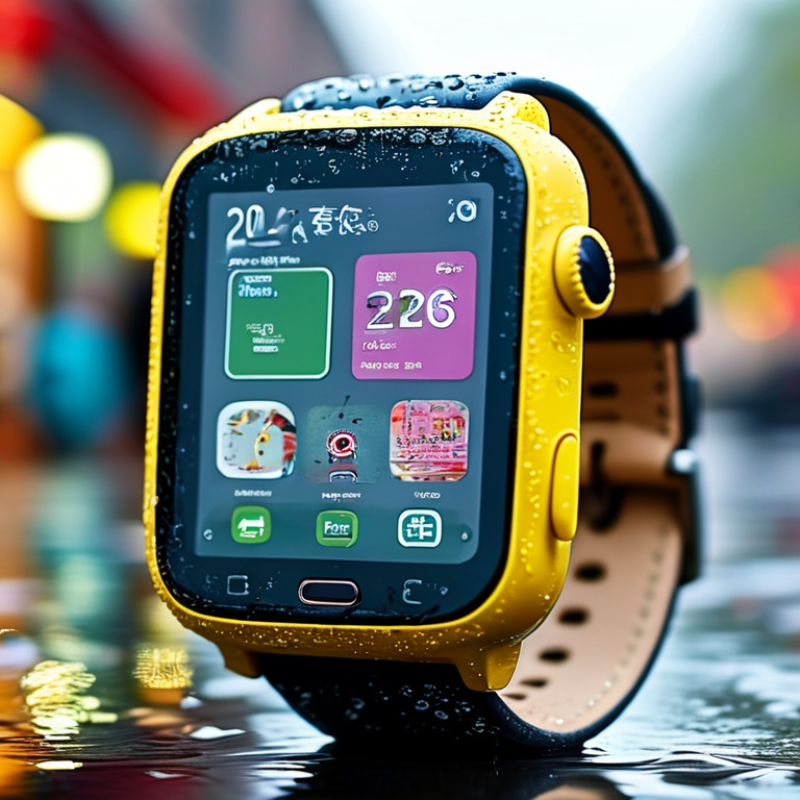
How to Choose a Kids 4G Smartwatch in 2026?

What a Kids 4G Smartwatch Does and Who Should Use It

A kids 4G smartwatch is a small communication and safety device, not a miniature smartphone. It usually supports voice calls, location sharing, emergency contacts, geofencing, and school-time controls. Some models also offer step tracking and simple voice messages. A 4G connection allows communication beyond home Wi-Fi, which matters during school trips or after-school activities.

The right users are children who need limited independence but are not ready for a smartphone. Common Sense Media reported that 42% of American children had their own phone by age ten, rising to 91% by age fourteen. A smartwatch can delay that jump. It keeps the screen smaller and the functions narrower. Parents can contact a child without opening unrestricted social media. That balance is useful.

However, location tools are not perfect. Indoor positioning may drift, batteries can fail, and a child may forget to charge the watch. The GSMA Mobile Economy 2024 report highlights the expanding role of connected devices, but connectivity does not remove human responsibility. Parents should check local network coverage, data handling, contact permissions, and school rules before purchase. Children also need to understand when location sharing is appropriate. More features are not always better. A simple interface may protect attention, though this is easy to underestimate.

Which Safety, Calling, and Location Features Matter Most

How to Choose a Kids 4G Smartwatch in 2026?

Safety, calling, and location tools should guide your choice, not flashy screens. A reliable watch needs a clear SOS button that children can press quickly. It should contact approved family members without opening public communication channels. Two-way calling matters too. Test the speaker near traffic, in a classroom, and outdoors. Voices should remain understandable without demanding maximum volume.

Location features need careful evaluation. GPS usually works best outside, while buildings can reduce accuracy. Look for location updates, safe-zone alerts, and a visible battery warning. A five-minute update may be useful during a walk, but excessive tracking can drain power. Check how location data is stored and shared. Privacy controls should be easy for parents to understand. In practical use, no location tool is perfect. A map pin can be several meters away, especially between tall buildings.

Tips: Save only essential contacts, then test every number monthly. Ask your child to practice the SOS action calmly. Charge the watch before school trips. Check network coverage in places your child visits regularly. Also, review alert settings together. Children may ignore constant notifications. I once assumed more alerts meant better safety, but that was not always true. Simple, well-tested settings often work better. Look for clear instructions, responsive support, and safety information backed by transparent testing.

How to Choose a Kids 4G Smartwatch in 2026? — Which Safety, Calling, and Location Features Matter Most

Feature Practical Minimum Preferred Specification Why It Matters What to Verify Before Buying
4G Cellular Connectivity Essential
4G LTE support with voice calling and data service.
4G LTE with VoLTE for voice calls, plus support for the LTE bands used by the intended mobile network. Many older 2G and 3G networks have been retired or are being retired. A 4G connection helps maintain calling, messaging, and location-data services where compatible coverage exists. Check network compatibility, SIM or eSIM requirements, activation rules, coverage, and whether emergency calls are supported.
Two-Way Calling Clear voice calls to and from the watch. Speakerphone, microphone with noise reduction, adjustable volume, and a visible call-status indicator. Children can contact approved adults without carrying a phone. Audio quality is especially important in busy places such as schools and public transport. Test call quality indoors and outdoors. Confirm that calling still works when mobile data is weak but cellular voice service is available.
Approved Contacts Parent-controlled contact list. Two-way contacts, role-based permissions, contact blocking, and no open dialing by unknown numbers. A closed contact system reduces unwanted calls and limits the child’s exposure to unknown callers. Confirm who can add, edit, or remove contacts and whether the child can change these settings.
SOS / Emergency Calling Dedicated or clearly accessible SOS button that alerts selected caregivers. Long-press activation, confirmation to reduce accidental triggers, automatic location sharing, and a configurable alert sequence. A simple physical action is easier to use under stress than navigating a small touchscreen. Check whether SOS calls caregivers, local emergency services, or both. Test the feature and review regional emergency-call rules.
Location Technologies Outdoor satellite positioning combined with cellular location. Multi-source positioning using GNSS, Wi-Fi positioning, and cellular networks, with automatic switching between methods. Satellite positioning is generally more precise outdoors, while Wi-Fi and cellular positioning can help indoors or near tall buildings. No method guarantees an exact position. Review the stated update conditions and test location performance in an open area, indoors, and in dense urban surroundings.
Location Update Frequency On-demand location requests and periodic updates. Configurable intervals, with faster updates during an SOS event and a clear indication of the last update time. Frequent tracking can improve awareness but uses more battery and mobile data. The last-known time is as important as the location itself. Look for update intervals, update delays, battery impact, and whether the watch reports when it cannot obtain a current fix.
Safe Zones / Geofencing At least one customizable location boundary. Multiple zones, adjustable radius, arrival and departure alerts, schedules, and separate caregiver notifications. Geofencing can notify caregivers when a child leaves a home, school, or activity area. It should supplement, not replace, supervision. Confirm whether alerts depend on a live network connection and whether the boundary radius can be adjusted for GPS limitations.
Location Privacy Controls Parent authentication and restricted access to location data. Encrypted account access, strong passwords or multifactor authentication, limited caregiver permissions, and clear data-retention controls. A child’s location is sensitive personal information. Access should be limited to trusted adults and protected against unauthorized account access. Read the privacy policy. Check data storage location, deletion options, sharing practices, breach-notification procedures, and whether advertising uses location data.
Battery Life At least one full day under ordinary use. Approximately 24–48 hours depending on calling, tracking frequency, screen use, and network conditions. A dead watch cannot call, send an SOS alert, or report a location. Frequent location updates and weak cellular signals can reduce battery life. Compare testing conditions, charging time, low-battery alerts, charging-contact design, and whether the charger is proprietary.
Water and Dust Protection Documented water-resistance rating suitable for everyday splashes. A clearly stated IP rating appropriate for the child’s activities, with guidance for swimming, bathing, and salt or chlorinated water. Water resistance is not the same as waterproofing. Damage can occur when seals age or when the watch is exposed to pressure, chemicals, or hot water. Check the exact IP rating and warranty exclusions. Follow the manufacturer’s limits for immersion, swimming, soap, and water temperature.
Durability and Fit Adjustable strap, covered screen edges, and a secure clasp. Shock-resistant construction, replaceable strap, readable display, and a comfortable fit for the child’s wrist. A watch that is uncomfortable or easily damaged is less likely to be worn consistently, reducing its safety value. Measure wrist size, inspect strap materials, and confirm availability of replacement straps and repair service.
Parent Controls Remote settings management and a device lock. School-time mode, restricted app installation, remote restart, firmware updates, and alerts for device removal or low battery. Controls can reduce distractions and help caregivers manage the watch without taking it from the child. Confirm which settings are controlled from the caregiver app and whether the child can bypass them by resetting the watch.
Messaging Text or voice messages between the child and approved contacts. Short voice messages, preset safety replies, delivery status, media restrictions, and contact-only messaging. Messaging can be useful when a child cannot make a full call, but unrestricted messaging may create privacy and distraction risks. Check whether messages are stored, whether unknown accounts can contact the child, and whether media sharing can be disabled.
School-Time Controls Schedule that limits nonessential functions during school hours. Custom weekday schedules with emergency calling and SOS remaining available. School mode can reduce distractions while preserving essential communication and safety functions. Confirm whether location and SOS remain active and whether schedules follow local time changes automatically.
Software and Security Updates Automatic or user-installable firmware updates. Published support period, signed updates, security notifications, and a secure account-recovery process. Updates can fix software defects and security vulnerabilities that could affect calls, location data, or account access. Ask how long updates are provided, whether updates require Wi-Fi or cellular data, and what happens when support ends.
Subscription and Operating Cost Transparent recurring cost for cellular service and essential app functions. Clear pricing for data, voice, location services, replacement SIM or eSIM, and cancellation. A low purchase price can become expensive if core safety features require a separate monthly service. Calculate the total cost over 12 and 24 months, including activation, roaming, replacement, and early-cancellation fees.
Emergency Information Caregiver contact details accessible from the watch or companion app. Medical notes, allergies, emergency contacts, and lock-screen emergency information with privacy protection. Accurate information can help a caregiver or responder act appropriately, but sensitive details should not be publicly exposed. Check who can view or edit the information and how it is protected if the watch is lost.

Decision rule: Prioritize reliable 4G compatibility, approved-contact calling, a tested SOS workflow, multi-source location, privacy controls, and dependable battery performance before choosing entertainment features. Location accuracy and battery life vary with network coverage, buildings, weather, usage, and update frequency.

How to Compare 4G Networks, SIM Plans, and Battery Life

A kids’ 4G smartwatch should be judged by network behavior, not advertised speed. GSMA Intelligence reported that 4G represented about 69% of global mobile connections in 2023. This makes 4G a practical choice for calls, location updates, and short voice messages. Check local coverage before buying. A strong signal at home may disappear near school or during a weekend trip.

SIM SIM plans deserve closer attention. Compare monthly data, voice minutes, roaming rules, and activation fees. Location tracking can consume more data than expected. A low-data plan may become expensive after repeated top-ups. The International Telecommunication Union reported that 5.5 billion people were online in 2024, yet access quality still differed widely between regions. Coverage maps are useful, but real streets are messier.

Battery claims need a test question. Ask how many hours remain with 4G, GPS, and location alerts running. IDC’s worldwide wearable device research shows that battery endurance remains a major buying factor for wearables. A watch promising several days may last only one day with frequent tracking. Test it for a school day. That is more honest than trusting the box. I would also choose a replaceable charging cable and check charging time, because children often forget overnight charging.

How to Check Durability, Comfort, Privacy, and Parental Controls

Choosing a kids’ 4G smartwatch starts with durability and comfort, not colorful features. Check an IP rating tested under IEC 60529, but remember it does not prove drop resistance. Ask for documented shock testing and operating-temperature limits. A practical home test is simple: inspect the strap, buttons, charging pins, and screen after repeated gentle knocks. The watch should sit flat, with rounded edges and no exposed metal. A heavy device may become uncomfortable during school hours.

Privacy deserves equal attention. UNICEF reports that one in three internet users worldwide is a child (UNICEF, The State of the World’s Children 2017). Choose a watch with data minimization, encrypted transmission, clear deletion options, and separate caregiver permissions. Location sharing should be visible and easy to disable. A microphone or camera should have a physical indicator, not merely a hidden software setting. I would not trust vague claims such as “secure by design.”

Parental controls should be specific, not decorative. Look for approved-contact lists, SOS calling, school-mode schedules, location history limits, and login alerts. Pew Research Center reported that 95% of U.S. teens had smartphone access in 2024 (Teens, Social Media and Technology 2024). That figure concerns teens, not younger children, so applying it broadly would be careless. No checklist is perfect. Test every control before handing over the watch, including battery loss, weak signal, and accidental taps. Even good settings can fail when adults stop reviewing them.

How to Choose a Kids 4G Smartwatch in 2026?

Compare the four essential evaluation areas by counting the practical checks that should be completed before purchase. These are checklist priorities, not brand or market-performance data.

Durability: Check the IP rating, drop resistance, screen and frame protection, and warranty or repair options. An IP67 rating means protection from dust and temporary immersion in up to 1 metre of water for up to 30 minutes under laboratory conditions.

Comfort: Review weight, case size, strap adjustability, and materials that touch the child’s skin.

Privacy: Verify data collection policies, encryption, account security, location-sharing controls, and data deletion options.

Parental controls: Look for approved contacts, SOS calling, location tracking, safe-zone alerts, school mode, and remote settings management.

How to Choose the Right Kids 4G Smartwatch for Your Family

How to Choose a Kids 4G Smartwatch in 2026?

Choosing the right kids 4G smartwatch starts with your family’s daily routine. Consider how your child travels, plays, and contacts you. A reliable 4G connection matters during school trips or crowded public places. Check network compatibility before buying. Not every watch works with every carrier or local frequency.

Look for accurate location sharing, adjustable safe zones, and clear two-way calling. Emergency contacts should be simple to manage. Battery life also matters; a watch that needs charging every evening may become inconvenient. Test the controls yourself. Small buttons can frustrate younger children, especially outdoors. Check water resistance, screen brightness, privacy settings, and available parental controls. GPS can drift near tall buildings. No watch is perfect.

Tips: Choose practical features over impressive extras. Confirm the return policy and software update support. Ask whether location data is protected and deleted responsibly. Let your child wear the watch for a few days before deciding. Their feedback may challenge your expectations. A colorful design may attract them, but comfort usually determines whether they keep wearing it. Reflect on your real needs. Do you need video calling, or would dependable voice contact be enough? A simpler device can sometimes be safer and easier to supervise.

FAQS

: What is a kids’ 4G smartwatch designed to do?

: It supports calls, location sharing, emergency contacts, and school-time controls. It is not a miniature smartphone.

Who should use a kids’ 4G smartwatch?

It suits children gaining independence but not ready for unrestricted smartphone access. Parents can stay connected without opening social media.

Why choose 4G instead of Wi-Fi only?

4G supports communication away from home networks. It can help during school trips, sports practice, or an after-school walk.

What should parents check before buying?

Check local coverage, school rules, data handling, and contact permissions. A strong signal at home may disappear near school.

How should families compare SIM plans?

Compare monthly data, call allowances, roaming rules, and activation fees. Frequent location updates may use more data than expected. Cheap plans can become costly.

How long does the battery usually last?

Battery life depends on calls, GPS use, and location alerts. A multi-day claim may become one day. Test it during a normal school day.

What charging details matter?

Check charging time and consider a replaceable charging cable. Children may forget overnight charging. That small problem matters.

How accurate is location sharing?

Location tools can drift indoors or near weak signals. The battery may fail, or a child may forget charging. It is helpful, not perfect.

Should parents activate every available feature?

No. A simple interface may protect attention and reduce confusion. More features are not always better. I might underestimate this risk.

Conclusion

Choosing a Kids 4G Smartwatch in 2026 starts with understanding how it can support everyday family communication, especially for children who are becoming more independent. A suitable watch may provide voice calling, messaging, emergency contacts, location sharing, safe-zone alerts, and activity reminders without requiring a child to carry a smartphone. Parents should focus on which safety and communication tools are genuinely useful for their family, while ensuring the child understands when and how these features should be used.

Before buying, compare network compatibility, SIM requirements, coverage, subscription costs, and realistic battery life. The watch should also be comfortable, water-resistant, durable, and simple enough for a child to operate. Privacy settings, data protection, contact approval, location controls, and parental management tools are equally important. The best choice will balance reliable connectivity, practical safety features, age-appropriate design, and ongoing cost, matching the child’s routine and the family’s expectations rather than offering unnecessary functions.

Evelyn

Evelyn

Evelyn is a dedicated marketing professional who combines strategic insight, product expertise, and a clear understanding of customer needs. As a key contributor to the company’s content and communications efforts, Evelyn regularly updates the corporate website with practical, informative blog......